You ask an assistant to refactor an HTTP handler, and it replaces your 500-line controller with a 40-line stub containing // ... rest of code remains the same. Or you ask it to fix a database query, and it confidently writes a solution using an ORM method deprecated three major versions ago. Or you run a multi-turn session across ten files and watch a $20 flat-rate subscription hit an opaque rate limit, while an API session burns thirty dollars in un-cached tokens.
The default reaction is to blame the model. People go to social media, declare that the model or GPT got dumber over the weekend, and jump to a different editor.
Almost every time, the model was not the problem. The failure happened two layers above it.
An AI coding setup is not a single product. It is a four-tier infrastructure stack. Conflating those tiers is why developers get burned by tools they do not understand.
The 30-Second Diagnosis: When an assistant breaks, 80% of failures originate in Layer 3 (the harness using vector RAG instead of LSP, or truncating patches) and Layer 2 (un-cached prefixes causing turn latency to spike from 1s to 15s). The model weights at Layer 1 are almost never the culprit.
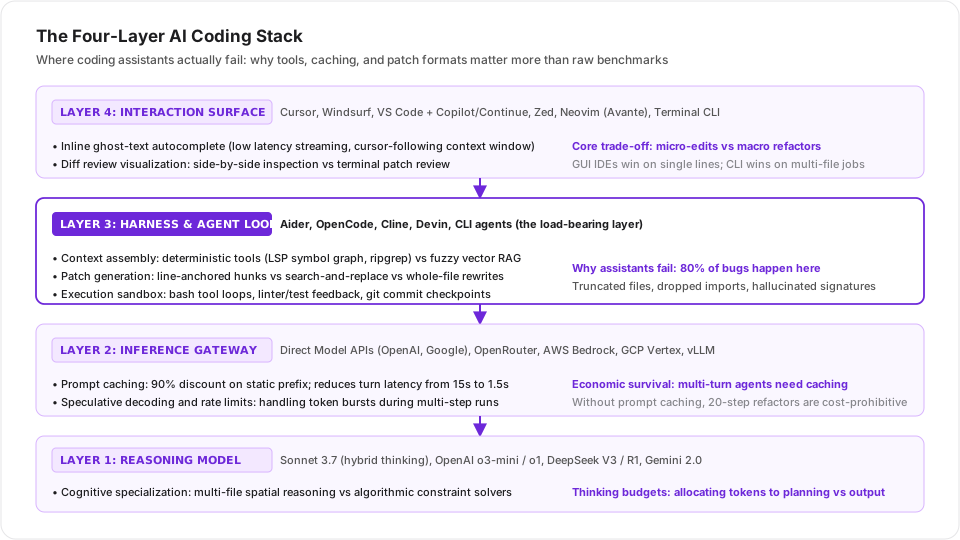
The four-layer hierarchy: Surface, Harness, Gateway, and Base Model.
Layer 1: The Model (Weights & Cognitive Specialization)
At the bottom of the stack are the raw neural weights: Sonnet 3.7, OpenAI o3-mini, DeepSeek R1, Gemini 2.0 Flash.
Models are not interchangeable commodities that differ only on a benchmark leaderboard. They have distinct cognitive profiles:
- Multi-File Spatial Reasoning: Sonnet 3.7 excels at understanding sprawling repository structure, matching existing code conventions, and respecting architectural boundaries.
- Algorithmic Constraint Solvers: OpenAI o3-mini and o1 excel at pure logic puzzles, self-contained algorithms, and competitive programming problems with rigid mathematical invariants.
- Cost-Weighted Inference: DeepSeek R1 provides deep reasoning traces at roughly a tenth of the API cost of Western frontier models, making brute-force exploratory passes affordable.
The model is responsible for exactly one job: predicting the next token given a context window. It does not read your files, it does not run your tests, and it does not write to your disk. When an assistant hallucinates a function signature, it is rarely because the weights cannot reason; it is because the layers above failed to supply the interface definition in the prompt.
Layer 2: The Gateway & Inference Provider (The Economics of Caching)
The model is hosted behind a gateway: direct vendor APIs (OpenAI, Google, Mistral), proxy aggregators (OpenRouter), enterprise hyperscalers (AWS Bedrock, Azure AI), or local engines (vLLM, Ollama). Developers treat this layer as an invisible pipe. It is actually the difference between an assistant you can afford to run and one that bankrupts you.
The load-bearing feature at Layer 2 is prompt caching.
Consider a realistic agent session:
- System prompt, tool definitions, rules: ~8,000 tokens
- Repository map, project instructions: ~12,000 tokens
- Five open source files and type definitions: ~30,000 tokens
- Total base context: 50,000 tokens
If your assistant runs a 15-step agentic loop to debug a failing test, it calls the API 15 times.
Without prompt caching, you pay for all 50,000 input tokens on every turn:
$$15 \times 50,000 = 750,000 \text{ input tokens}$$On a frontier reasoning model ($3 per million input tokens), that single debugging task costs $2.25, and every turn takes 12 to 18 seconds of time-to-first-token latency while the provider processes the prefix.
With prompt caching (where providers like OpenAI and frontier gateways offer a 90% discount on cache hits):
- Turns 2 through 15 hit the cache: 50,000 tokens at a 90% discount ($0.015 per turn)
- Total input cost: $0.36 (an 84% cost drop)
- Time-to-first-token drops from 15 seconds to under 1.5 seconds.
Prompt caching is not a minor cost optimization. It is the architectural prerequisite for multi-turn autonomous coding. If your provider drops cache keys, rate-limits prefix writes, or does not support prompt caching, agentic coding becomes unusable.
Layer 3: The Harness & Agent Loop (Where 80% of Failures Happen)
The harness is the orchestrator: Aider, OpenCode, Cline, Devin, and terminal coding harnesses. This is the engine room of the stack, and it is where almost all assistant failures originate. A harness owns three responsibilities: context retrieval, patch application, and the tool execution loop.
1. The Vector Search Trap (RAG vs LSP)
Early coding assistants relied heavily on vector embeddings for codebase context. You type a prompt, the harness converts it to a vector, searches a vector database of code chunks, and pastes the top five semantic matches into the prompt.
For software engineering, pure vector RAG is fundamentally broken. Embeddings understand semantic similarity, not software architecture:
- If you ask to modify
HandleUserLogin, vector search grabs five files that contain the word “login” (comments, documentation, auth configs). - It completely misses the
Userstruct definition, the database interface, and the middleware call site located in completely different directories.
Modern harnesses have largely abandoned pure vector search in favor of deterministic tools:
ripgrepand file discovery: Fast regex sweeps across filenames and content.- Language Server Protocol (LSP): Querying the actual compiler/language server for
goToDefinition,findReferences, andtypeDefinition. This follows the real call graph instead of guessing based on word proximity. - AST Parsing (tree-sitter): Structural syntax parsing that extracts class skeletons and function signatures without burning context on implementation bodies.
2. Patch Generation Strategies
Once the model decides what code to write, how does the harness apply it to your disk?
There are three main strategies:
| Strategy | How It Works | The Failure Mode |
|---|---|---|
| Whole-File Rewrite | The model outputs the entire file from line 1 to the end. | The Lazy Stub: On files longer than 200 lines, the model runs out of output tokens or patience and emits // ... existing code ..., destroying your implementation. |
| Search and Replace | The model outputs a search block and a replace block. | The Fragility Trap: If indentation shifts by two spaces, or if the search block matches three different places in the file, the patch fails or corrupts code. |
| Line-Anchored Patching | The harness copies line tags from latest reads and applies anchored surgical edits. | Zero hallucination of unchanged lines; lowest token output; fails safely if stale lines are touched. |
When an assistant corrupts your file, it was almost never a reasoning failure in the model. It was a patch application failure in the harness.
3. The Tool Execution Loop & Sandboxing
An assistant that cannot execute tools is flying blind. A capable harness runs a closed loop:
- Propose edit.
- Apply patch to file.
- Run project linter or compiler (
cargo check,go test ./...,npm run build). - Read compiler errors back into the context window.
- Self-correct before yielding to the user.
Without this loop, the user acts as the compiler, manually copying errors back and forth between terminal and chat box.
4. What real benchmarks actually measure: scaffolds over weights
Early AI coding benchmarks (like HumanEval or MBPP) tested single functions in isolation: the model was given a docstring and asked to generate a Python function.
Modern evaluations look entirely different because real software engineering is an integration test:
- Aider’s Polyglot & Refactoring Benchmarks: The Polyglot benchmark tests 225 problems across six languages (C++, Go, Java, JS, Python, Rust) in isolated containers with test feedback loops. More importantly, Aider’s Refactor benchmark asks models to refactor 89 massive methods, specifically testing whether the harness and model can output dense code without truncating lines, dropping syntax, or taking lazy shortcuts.
- SWE-bench Verified & SWE-bench Pro: Evaluating models on hundreds of real GitHub issues. The most telling finding from the SWE-bench leaderboard is scaffold sensitivity: taking the exact same base model and pairing it with an optimized execution harness (such as
mini-SWE-agentwith structured bash tools and iterative retries) swings issue resolution rates by 20 to 30 percentage points.
When frontier models reach 70% to 80%+ on SWE-bench Verified, the harness is doing half the heavy lifting.
Layer 4: The Interaction Surface (IDEs, Extensions, and CLI)
The top layer is what you actually look at:
- Forked AI IDEs: Cursor, Windsurf.
- Terminal & CLI Native: Aider, OpenCode, and dedicated terminal coding harnesses. Each surface optimizes for an entirely different phase of engineering work.
GUI IDEs Win at Micro-Edits
Cursor and Windsurf provide a polished experience for single-file, interactive development:
- Shadow Workspaces: Cursor runs a background language server in a hidden workspace to check compiler diagnostics while the model streams text.
- Speculative Tab-Completion: Predicting where your cursor will jump next and pre-streaming ghost text.
- Inline Visual Diffs: Reviewing green and red diff hunks directly in the editor buffer with keyboard shortcuts (
Ctrl + K).
The downside: Cursor is a closed-source downstream fork of VS Code. You are permanently dependent on a third-party vendor keeping up with upstream VS Code security patches, extension marketplace quirks, and enterprise SSO integrations.
Terminal-native harnesses (like Aider, OpenCode, or headless CLI agents) operate directly inside your shell:
- They do not compete with your editor. You keep your personalized Neovim, Emacs, or VS Code setup intact.
- They excel at multi-file migrations, sweeping test suites, and autonomous background execution where visual GUI chrome only adds overhead.
The $20 Flat-Rate Trap vs Pay-Per-Token Reality
One of the biggest points of confusion among developers is the economic divide between flat-rate subscriptions and direct API access.
The Flat-Rate Tier (Copilot, Cursor Pro: $20/month)
- Providers cannot afford to give you unlimited raw frontier models for twenty dollars.
- Behind the scenes, flat-rate tiers rely on aggressive cost controls: hard rate limits, request queues during peak hours, smaller fallback models, and speculative routing.
- This is fine for interactive autocomplete and small edits. It falls apart during heavy multi-file architectural refactors that consume millions of context tokens.
Pay-Per-Token APIs (Aider, OpenCode, CLI Agents)
- There are no opaque rate limits or hidden model downgrades during peak hours.
- With Layer 2 prompt caching, an intensive 20-step refactor across a codebase might cost $0.80 to $1.50. You pay for what you actually execute, with full visibility into input, output, and cache hit metrics.
Diagnosing the Failure
The next time an AI assistant produces garbage, resist the urge to declare that “the model is broken”. Walk down the stack:
- Did the Surface fail? Did the editor drop the cursor context or truncate the inline diff?
- Did the Harness fail? Did it retrieve irrelevant vector chunks instead of symbol definitions? Did its patch format hallucinate code while rewriting a 400-line file? Did it skip running tests?
- Did the Gateway fail? Did a proxy drop your prompt cache, causing turn latency to blow up from 1 second to 15 seconds?
- Did the Model fail? Was the algorithmic reasoning fundamentally flawed despite clean context and precise tools?
Eighty percent of the time, the failure lives in Layers 2 and 3. When you understand the stack, you stop cargo-culting tools and start building an environment that actually survives a production codebase.